IT company in Houston, Texashello@hawkonix.com
Start a project
Hawkonix product

Dry cleaning POS software for counter, plant and delivery

CleanerHawk is cloud dry cleaning POS software for dry cleaners and laundries. Write tickets in seconds, tag every garment, track it through the plant, run pickup and delivery routes, and let customers pay online from your own branded app.

Cleaned garments in plastic covers hanging on a dry cleaner conveyor rack
ProductCleanerHawk
Starts at$79 / month
Runs onWindows · macOS · iPad
Built & hosted byHawkonix, Houston TX

A dry cleaner runs three operations at once: a counter that takes in garments, a plant that cleans, presses and assembles them, and often a van on the road. CleanerHawk is dry cleaning POS software that connects all three. A ticket written at the counter prints a barcode tag for every garment, each scan in the plant moves the order forward, and the customer is emailed when it is ready.

The counter works in a browser on Windows PCs, Macs, iPads and Android tablets, and installs as an app. If the internet drops, it keeps writing tickets and syncs when the connection is back, with ticket numbers reserved per register so they never clash. Payments run through Stripe, including Stripe Terminal card readers at the counter and online payment from the customer app.

CleanerHawk is built and run by Hawkonix in Houston, Texas. It fits dry cleaners, laundries, laundromats with wash and fold, alterations shops, pickup and delivery services and commercial laundries. Plans are month to month, and moving your customers and ticket history from your old system is done with a CSV import. For custom work around your plant, see our POS and retail software service.

Who CleanerHawk is for

  • Dry cleaners with one or several drop-off stores
  • Laundries and laundromats offering wash and fold
  • Alterations and tailoring shops
  • Pickup and delivery laundry services
  • Commercial laundries serving hotels, offices and uniform customers
  • Owners running a central plant with satellite stores
01Features

Everything inside CleanerHawk

12 modules, one login, one database.
01

Counter POS and tickets

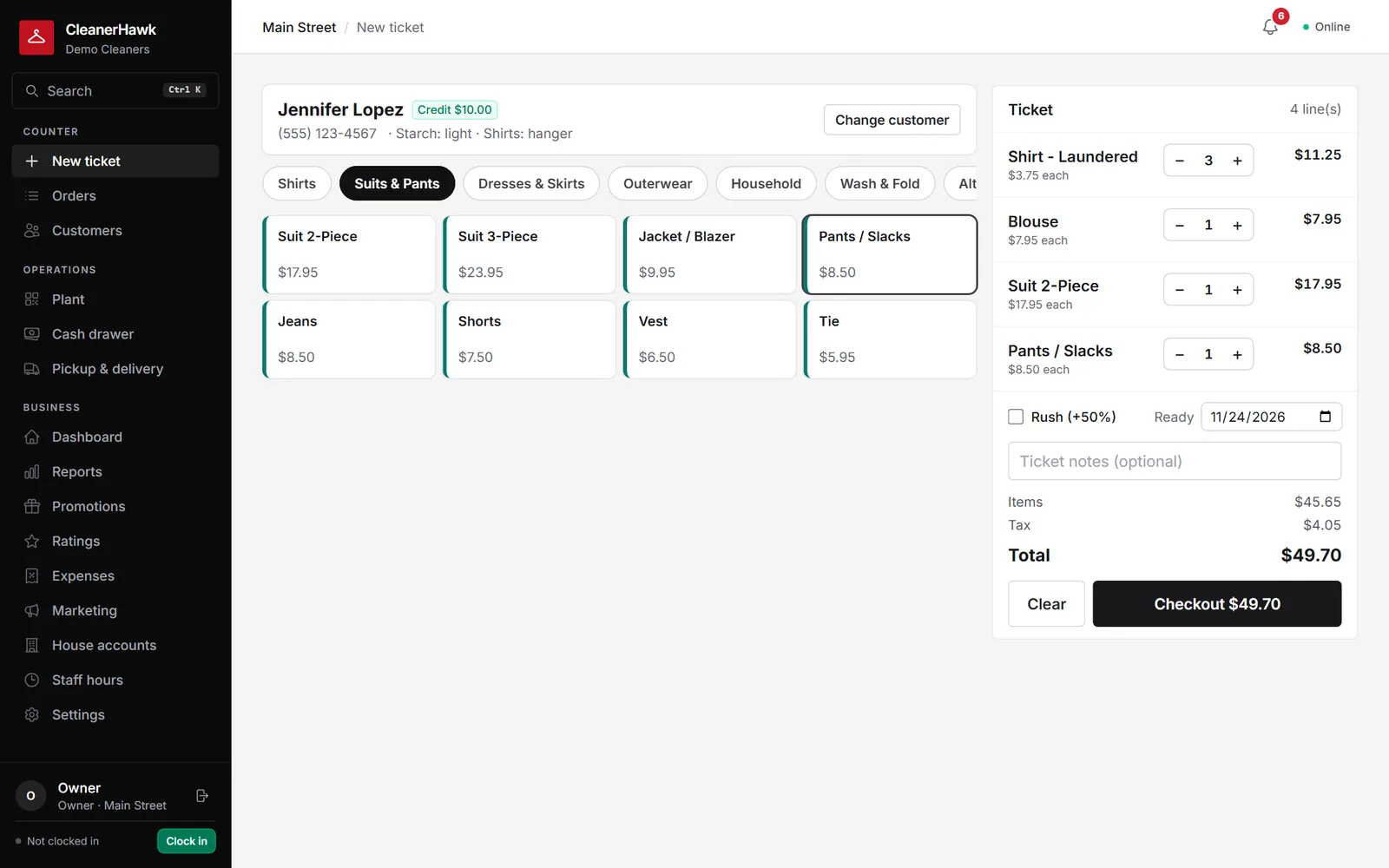
Write a ticket in seconds. Search the customer by name or phone, pick garments from a grid by category, set quantities, add upcharges such as stain or silk, apply rush percentage and a ready-by date. Starch and shirt preferences show on screen, and each customer can have their own price list, discount or tax exemption. Staff switch users with a PIN.

  • Garment grid by category with upcharges and rush
  • Customer price lists, discounts and tax-exempt customers
  • Notes and saved starch or shirt preferences
  • PIN switching between staff on one register
02

Garment tags and quick drop

Every garment gets its own barcode tag, printed on a thermal tag printer through the free Print Bridge, along with receipts and bag tags. For customers in a hurry, quick drop takes the bag, prints a bag tag per bag with the ticket number, and lets you itemize and price later. A quick-drop ticket cannot be marked ready or released until it is itemized.

  • One barcode tag per garment
  • Direct printing to ESC/POS thermal printers over network or USB, no print dialog
  • Cash drawer opens on cash sales
  • Quick-drop bags waiting to be itemized shown on the bell
03

Payments and cash drawer

Take cash with change and a drawer that pops, card on Stripe Terminal smart readers, gift cards, store credit, house accounts or a split across several. Customers can save a card on file, and with autopay on the ticket is charged the moment it is ready. At close, count the drawer against expected cash and print the end-of-day report.

  • Stripe Terminal readers (WisePOS E, S700), usable from any browser including iPad
  • Card on file with autopay when the order is ready
  • Pay online from the customer app or tracking link
  • Opening float, cash in and out, expected versus counted with variance
  • End-of-day (Z) report and refunds
04

Offline mode

The counter keeps writing tickets and taking payments without an internet connection, then syncs automatically when the connection returns. Ticket numbers are reserved per register in advance, so two counters working offline never hand out the same number. Your staff do not need to do anything different when the connection drops.

  • Tickets written offline and synced automatically
  • Ticket number ranges reserved per register
  • Included on every plan
05

Plant production tracking

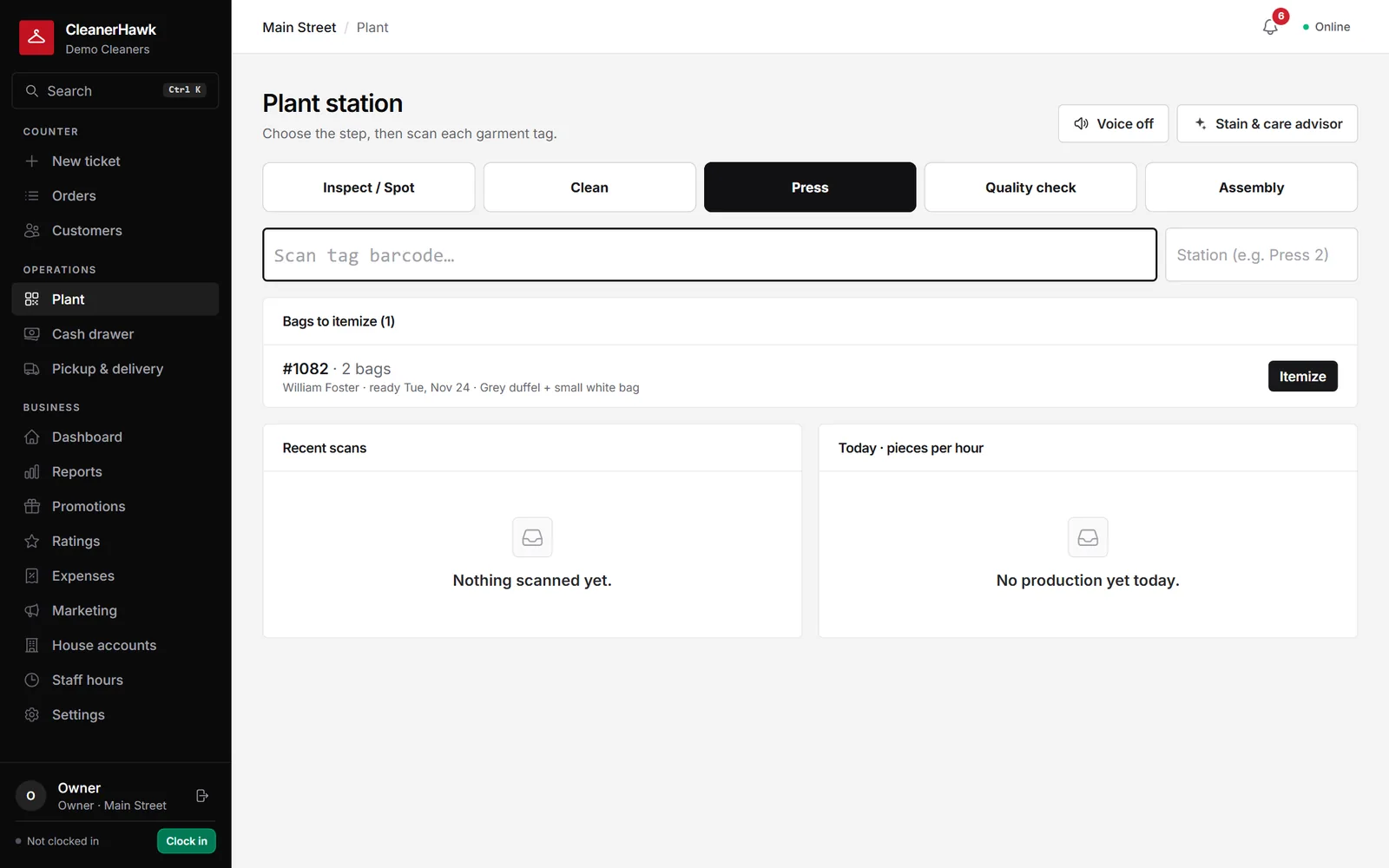
Scan each garment tag at the cleaning, pressing and assembly stations, and the order becomes ready when the last garment is assembled. Assembly is voice-guided: the station speaks each scan, such as "Ticket 1042, 2 of 3, rack B2", so assemblers keep their hands and eyes on the garments. A plant board shows where every order stands.

  • Station scans for cleaning, pressing and assembly
  • Rack locations recorded at assembly
  • Voice-guided assembly
  • Stain and care advisor for plant staff, powered by AI
06

Garment photos

Photograph stains and damage at drop-off with a tablet or phone camera, and photograph the finished garment too. Photos appear on the ticket and in the customer's app as an online wardrobe, which settles most "was that stain there before?" conversations before they start. Images are resized, stored privately and served through short-lived signed links.

  • Photos taken at drop-off and after cleaning
  • Shown on the ticket and in the customer app
  • Private storage with expiring links
07

Pickup and delivery routes

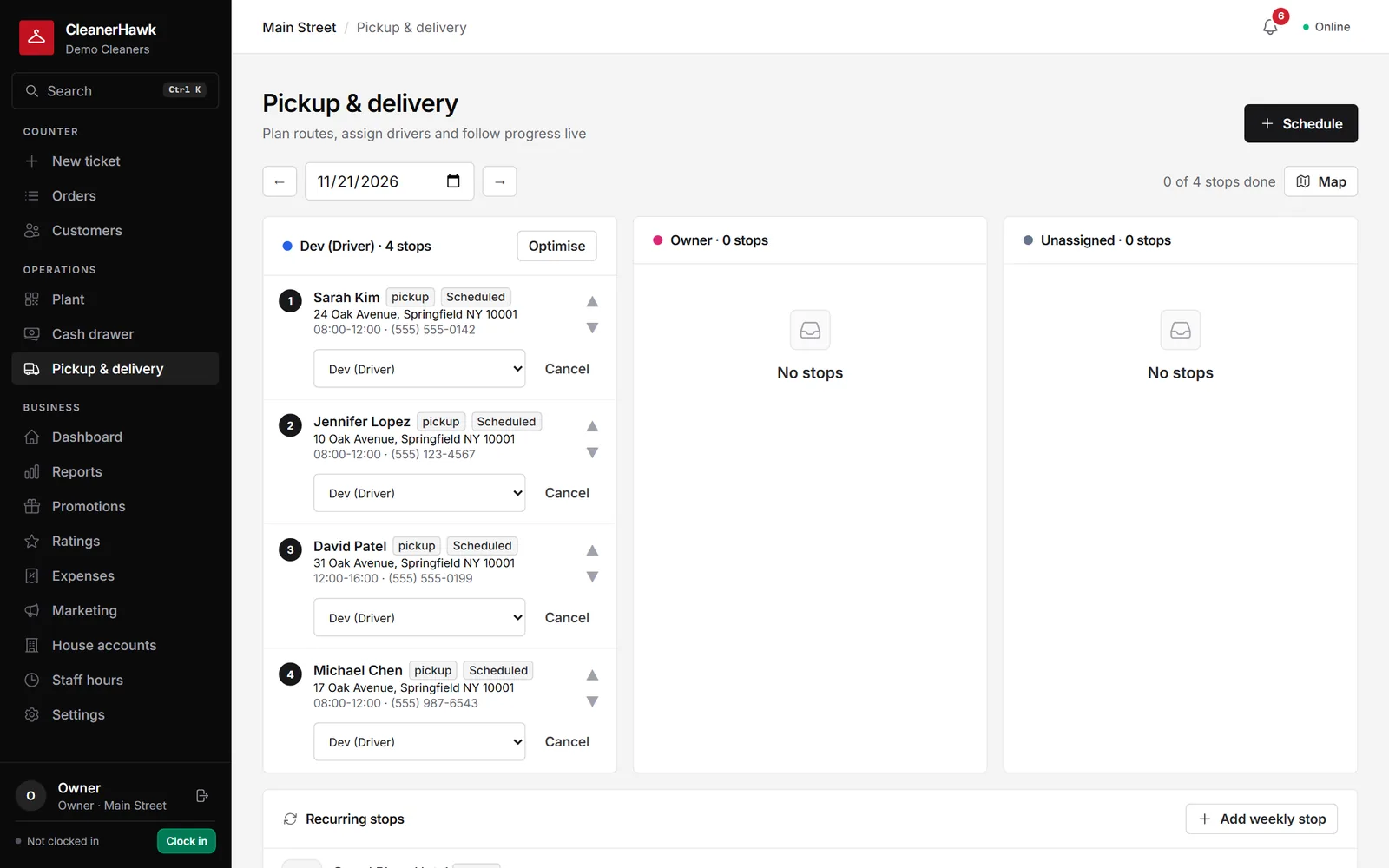
Customers request pickups in the app and requests land in an inbox on the dispatch board, which has a lane per driver for each day. Optimize puts a driver's stops in the shortest order from the store while keeping morning stops ahead of afternoon ones, and a map shows every route. Drivers run the route from their phone.

  • Navigate one stop or the whole route in Google Maps
  • Starting a stop emails the customer that the driver is on the way
  • Collect cash or card, complete with a name or record why a stop failed
  • Recurring weekly pickups, for example a hotel every Tuesday morning
08

Branded customer app

Each business gets its own customer web app that installs on the home screen as that business's app. Customers sign in with a one-time code by email, with no password. They see their orders with live status and history, pay a balance by card, book pickups and deliveries, save a card for autopay, rate orders and ask the AI assistant questions about their own orders.

  • Online payment through the business's own Stripe account
  • Pickup and delivery requests with a weekly repeat option
  • Address, starch and text preferences edited by the customer
  • Loyalty points and a refer-a-friend link
09

Customer profiles and notifications

Each customer profile holds preferences, notes, full history and insights such as average ticket, visit frequency and favorite items. Customers are grouped into segments (VIP, regulars, new, at risk, lapsed). Automatic emails go out when an order is received, ready or on its way, using templates you can edit, and every ticket has a public tracking page.

  • VIP and at-risk tags on the profile
  • CSV import and export of customers
  • Earlier ticket history imported from your old system
  • Notifications by email (no SMS)
10

Loyalty, promotions and email marketing

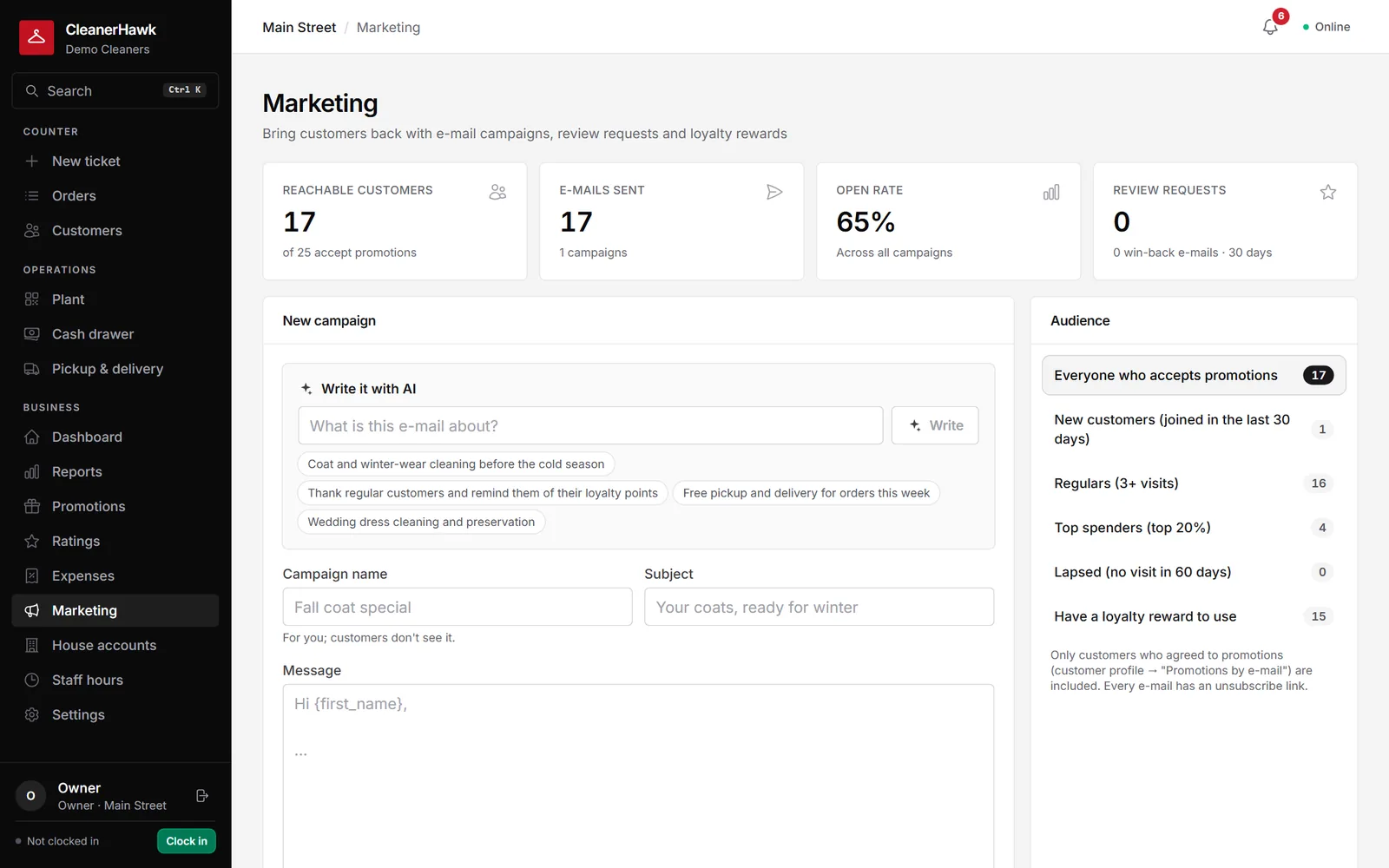
Customers earn points per dollar paid and redeem rewards as store credit; refunds take points back. Promo codes can be percent or amount off with minimums, caps, dates and usage limits, and gift cards sell at the counter or go out free as an apology. Email campaigns go to segments, with AI-written drafts and automations that run on their own.

  • Refer a friend: both get credit after the friend's first paid pickup
  • Gift cards emailed to the recipient and spent over many visits
  • Review requests after pickup, win-back emails and reminders for uncollected orders
  • Open tracking and one-click unsubscribe
11

House accounts, ratings and expenses

Hotels, offices and uniform customers can charge tickets to a house account with terms in days, and receive a monthly statement by print or email. After pickup, customers rate the order from one to five stars; happy customers are invited to leave a Google review, and unhappy ones show on the dashboard for a follow-up call. Expenses by category feed a profit figure.

  • Monthly statements and payments against the balance
  • One-tap rating email after pickup
  • Profit = money collected minus expenses minus time-clock wages
  • Expense CSV export
12

Reports, staff and multiple locations

The owner dashboard covers any date range against the previous period, with a busiest-hours heatmap, sales by category and item, payment mix, staff, turnaround and on-time percentage. A monthly sales tax report and CSV exports are included. Staff get roles with permissions and a time clock, and several stores sit under one account with shared customers.

  • Roles: owner, manager, counter, plant and driver
  • Clock in and out, weekly hours, wages and payroll CSV
  • Activity log of refunds, price changes and voids
  • Per-store reports and drawers, plus a store comparison report
  • AI business insights on the dashboard

02Screens

Real screens from the product

app.cleanerhawk.com
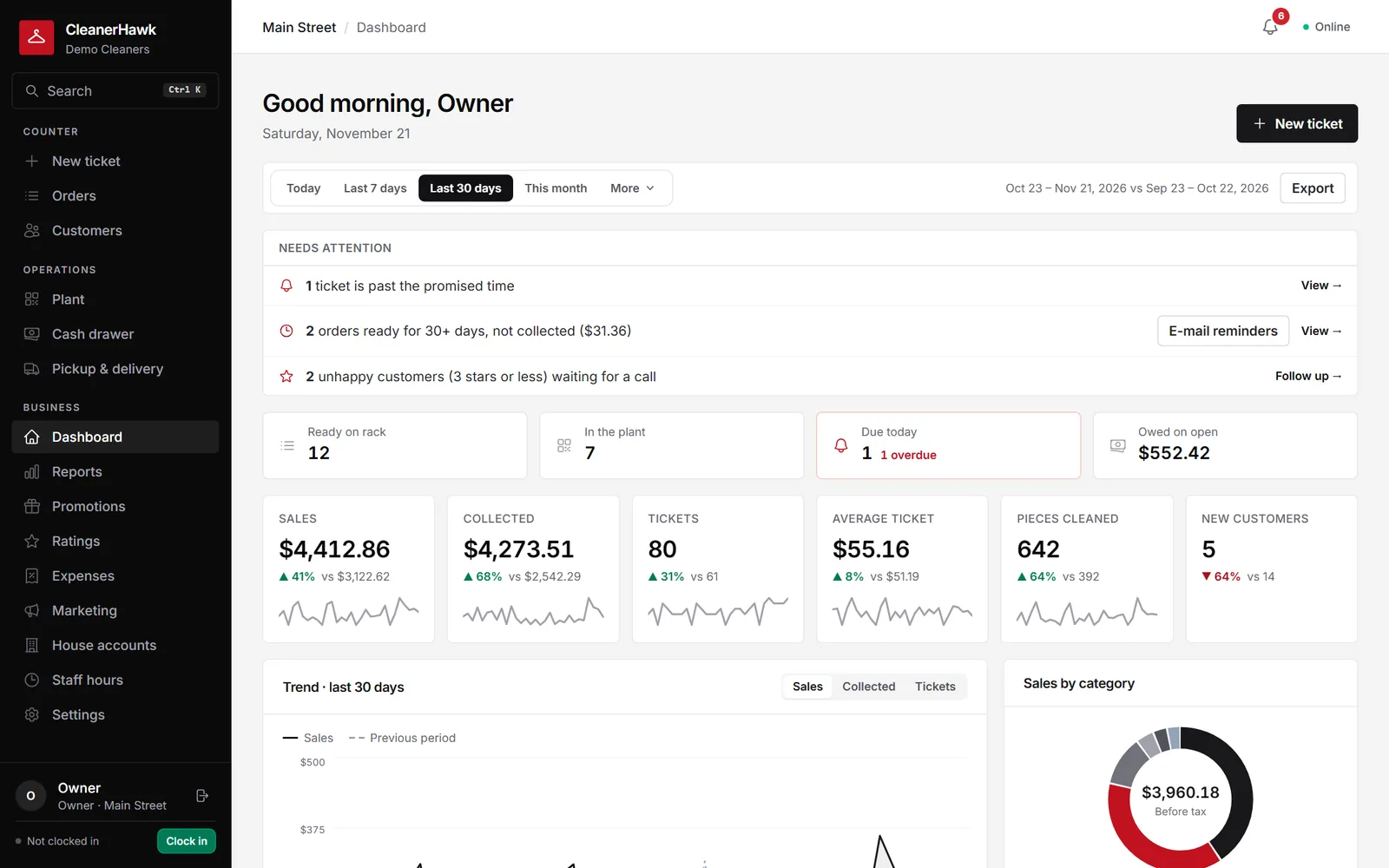
CleanerHawk dashboard
CleanerHawk new ticket screen
new ticket
CleanerHawk plant screen
plant
CleanerHawk deliveries screen
deliveries
CleanerHawk marketing screen
marketing
03Why it wins

Why teams choose CleanerHawk

01

Plant tracking down to the garment

Every garment has its own tag and is scanned at each station. The order turns ready on the last assembly scan, and voice guidance tells the assembler the rack.

02

A counter that does not stop

Offline mode keeps tickets and payments going without internet, and reserved ticket numbers per register mean nothing clashes when it syncs.

03

Delivery built in, not bolted on

Pickup requests, a dispatch board, route optimization, a map and a driver route on the phone are part of the same system as the counter and the plant.

04

Your app, your payments

Customers use a branded app under your business name and pay balances online through your own Stripe account, with card on file and autopay when the order is ready.

04Pricing

Simple plans, published prices

Prices in USD. Yearly billing: $790 (10 months)

Starter

$79
per month
Yearly billing: $790 (10 months)

One store getting started: counter POS, customers, cash drawer and offline mode.

  • 1 store, 5 staff users and 2 devices
  • Counter POS with garment grid, upcharges and rush
  • Customer profiles
  • Cash drawer and end-of-day report
  • Offline mode
  • Owner dashboard
  • Online order tracking page
Start on cleanerhawk.com
Most popular

Professional

$149
per month
Yearly billing: $1,490 (10 months)

Growing businesses: plant tracking, notifications, price lists, full reports and every growth feature.

  • Up to 3 stores, 20 staff users and 8 devices
  • Plant production tracking and customer price lists
  • Email notifications, advanced reports and CSV export
  • Pickup and delivery routes and the customer app with online payment
  • Stripe Terminal card reader payments
  • Loyalty, promo codes, gift cards and email marketing
  • House accounts, time clock, expenses, ratings and the AI assistant
Start on cleanerhawk.com

Enterprise

$299
per month
Yearly billing: $2,990 (10 months)

Multi-store and plant operations with no limits.

  • Everything in Professional
  • No limit on stores
  • No limit on staff users
  • No limit on devices
  • Store comparison across every location
Start on cleanerhawk.com
Runs on
WindowsmacOSiPadAndroid tabletsWeb browseriOS and Android staff app
05FAQ

Questions we hear often

What hardware does CleanerHawk work with?
It runs in the browser on Windows PCs, Macs, iPads and Android tablets. The free Print Bridge prints tickets and garment tags straight to ESC/POS thermal printers over the network or USB and opens the cash drawer. Card payments use Stripe Terminal smart readers such as the WisePOS E and S700.
Does it work without internet?
Yes. The counter keeps writing tickets without a connection and syncs automatically when it is back. Ticket numbers are reserved per register, so two counters working offline never produce the same number. Offline mode is included on every plan.
Can I move my customers from my current system?
Yes. Export a CSV of customers from SPOT, CleanCloud, Compassmax or a spreadsheet. Columns are recognized by name, there is a preview, and existing phones and emails are skipped, so importing twice is safe. Ticket history imports too and counts toward visits and lifetime spend, but not toward sales reports.
Do customers get text messages?
No. Order notifications go by email: when the order is received, when it is ready and when the driver is on the way. Templates are editable, and every ticket also has a public tracking page you can share.
How are card payments handled?
Payments are processed by Stripe on your business's own account. You can take cards on a Stripe Terminal reader at the counter, let customers pay balances online from the app or tracking link, and charge a saved card on file, including automatically when an order is ready.
Is there a contract?
No long contract. Plans run month to month, with a free trial to start. Yearly billing is available at 10 times the monthly price, and you can change plans as you add stores or devices.
Can I run several stores and a central plant?
Yes. Several stores sit under one account with shared customers, each with its own reports and drawer, and a store comparison report puts them side by side. Professional covers up to 3 stores; Enterprise has no limit on stores, staff or devices.
06Also from us

More products from Hawkonix

Hawkonix designs, builds, hosts and supports these products every day. The same engineers work on client projects.

See CleanerHawk live.

Book a 30-minute demo with the team that builds CleanerHawk. We will show it with your kind of data, answer pricing questions and plan your move from your current system.

We reply within one business day. Your details are used only to answer you — see our privacy policy.